Frontend Architecture That Grows With Your Application

A frontend application rarely becomes difficult to maintain all at once.
It usually starts with a component that does a little too much.
A page fetches data, transforms the response, checks permissions, calculates totals, and renders a form. Then another page needs the same calculation, so someone copies it. An API response changes, and suddenly several unrelated screens need updating.
The application still works. Making changes just becomes slower.
I’ve faced this while managing UI components, API calls, business rules, state, responsive layouts, accessibility, and background work. Looking through other projects helped me recognize a recurring idea: maintainable code gives each responsibility a clear home.
But that introduces another trap. We can spend so much time organizing code that we build an architecture more complicated than the product.
The approach I now prefer is simple:
Start with clear feature boundaries. Add abstractions when they solve a problem you can explain.
1. Organize Around Features First
A project with global folders such as components, services, and hooks can work well initially. As it grows, however, changing one feature may require navigating across the entire codebase.
Feature-based organization keeps related code together:
src/
  app/
    providers/
    routes/

  features/
    invoices/
      components/
      invoice.api.ts
      invoice.schemas.ts
      invoice.rules.ts
      invoice.queries.ts
      InvoicePage.tsx

    customers/
      components/
      customer.api.ts
      customer.queries.ts

  shared/
    ui/
    lib/
    config/
This is a starting point, not a folder checklist.
A feature with one screen and a single request may need only a few files. Another feature may eventually need services, adapters, workers, and more detailed subfolders.
Keep code inside its feature until there is a clear reason to share it. Before moving something into shared, ask:
- Do its consumers share the same meaning and behavior?
- Should a change affect every consumer?
- Can it work without depending on one feature’s internal details?
Two buttons may deserve one shared component. Two workflows that happen to look similar may still need separate implementations.
Similar code is evidence to investigate, not an automatic instruction to abstract.
2. Separate Responsibilities Without Creating a Layer for Everything
Your application may need several responsibilities, but each responsibility does not require a separate architectural layer.
| Responsibility | What belongs here | When to separate it |
|---|---|---|
| UI | Rendering, input, focus, interaction | From the beginning |
| API access | Requests, transport details, response handling | When a feature communicates externally |
| Validation | Checking untrusted input | At relevant trust boundaries |
| Mapping | Converting external data into application models | When the shapes differ |
| Business rules | Calculations and domain decisions | When rules become substantial or reused |
| Services | Coordinating a use case across dependencies | When orchestration adds meaningful behavior |
| State | Local interaction state and shared application data | According to ownership and lifetime |
| Infrastructure | Configuration, monitoring, external clients | As integrations appear |
| Workers | CPU-intensive background work | When measurement justifies them |
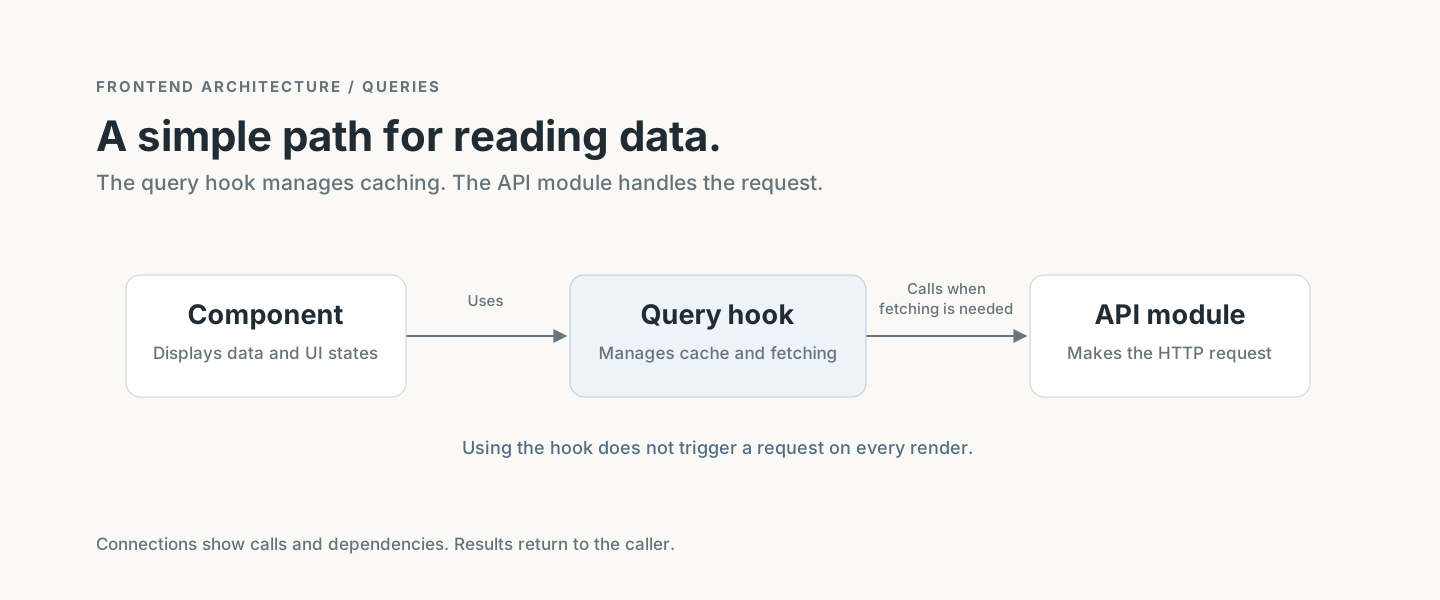
For a small feature, this may be enough:
For a more involved workflow:
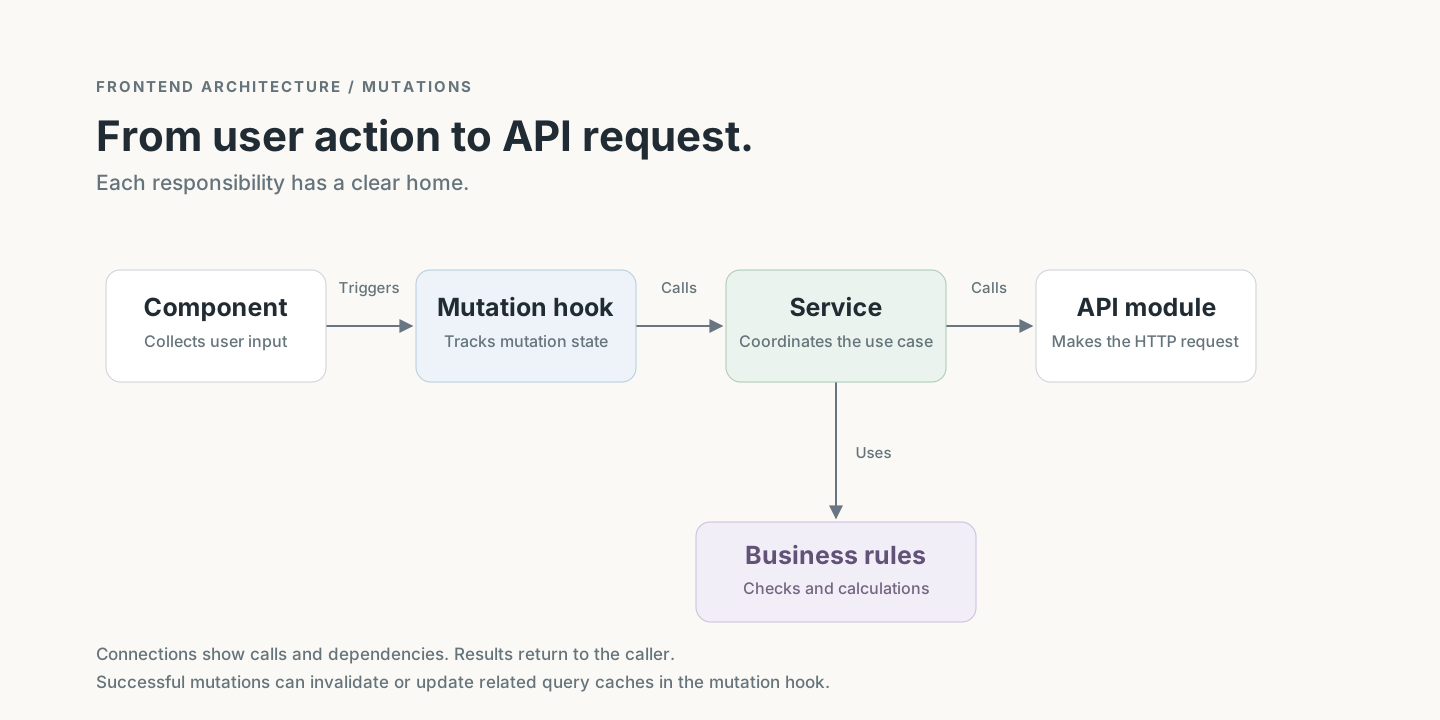
These arrows describe dependencies and calls. Results return to callers, the important constraint is avoiding circular dependencies and hidden ownership.
A service that only renames an API call adds little value:
async function getInvoices() {
  return invoiceApi.list();
}
Introduce that service when it coordinates something meaningful such as validating a workflow, applying rules, or combining information from multiple owners.
3. Give External Data a Clear Entry Point
Components should not need to know how an endpoint is assembled or what transport library the application uses.
Keep that knowledge in a feature-owned API module.
Some teams call this a repository. Others use api, client, or gateway. A repository can also abstract persistence, so it is broader than “a file containing HTTP calls.”
Choose a name that describes the abstraction you actually have.
For example, an API boundary can validate and normalize an invoice response:
// invoice.api.ts
import { z } from "zod";

const invoiceResponseSchema = z.object({
  id: z.string(),
  status: z.enum(["draft", "sent", "paid"]),
  total_minor: z.number().int().nonnegative(),
});

export async function getInvoice(
  invoiceId: string,
  signal?: AbortSignal,
) {
  const response = await fetch(
    `/api/invoices/${encodeURIComponent(invoiceId)}`,
    { signal },
  );

  if (!response.ok) {
    throw new Error(
      `Unable to load invoice: HTTP ${response.status}`,
    );
  }

  const raw: unknown = await response.json();
  const invoice = invoiceResponseSchema.parse(raw);

  return {
    id: invoice.id,
    status: invoice.status,
    totalMinor: invoice.total_minor,
  };
}
The component receives a predictable application model instead of a transport response.
This example assumes the API returns integer minor units for money. Currency precision and rounding still need explicit rules in a real financial application.
Extract the mapping into another file when it becomes substantial or reusable. A three-field conversion does not automatically need its own transformer layer.
Also avoid silently replacing malformed required data with believable defaults. Turning an invalid total into 0 can hide a contract failure.
4. Make Ownership Explicit
Each feature should provide a clear way for other features to use its capabilities.
For example, the invoices feature may need organization details. It should consume the organizations feature’s public API rather than reach into its internal files.
import { organizationService } from "@/features/organizations";
If a repository has an owner service, other features should go through that service. That preserves the owner’s validation and business rules.
However, every repository does not need an empty service merely to satisfy a naming rule. A small feature can expose a well-defined API function directly.
The principle is:
External consumers depend on a feature’s public contract, while its internal implementation remains private.
When two features repeatedly depend on each other, investigate the design. A higher-level workflow may need to coordinate them, or some shared concept may need its own owner.
Circular imports are often a symptom of unclear responsibility.
5. Keep Business Rules Independent of the UI
Business rules are easier to understand and test when they are ordinary functions with explicit inputs.
type Invoice = {
  status: "draft" | "sent" | "paid";
};

export function canEditInvoice(invoice: Invoice) {
  return invoice.status === "draft";
}
The UI can use this rule to explain available actions. A service can use it to guard a workflow.
Keep these functions independent of React, browser storage, and network clients wherever practical.
That makes it possible to test a rule without rendering a page or mocking half the application.
Frontend rules still do not establish authorization. The server must enforce permissions and validate state transitions independently.
A disabled button improves the experience; it does not prevent a user from making a request directly.
6. Put State Where It Belongs
“State management” does not mean putting everything into a global store.
Different state has different owners:
| State | Typical home |
|---|---|
| Open dropdown or selected tab | Local component state |
| Values being edited | Form state |
| Shareable filters and pagination | URL |
| Remote records | A server-state cache |
| Cross-feature client preferences | Context or a client store |
| Values calculated from existing data | Derived during rendering or computation |
Avoid maintaining multiple writable copies of the same information.
If a query cache owns the invoice list, copying that list into Zustand creates another synchronization problem.
Likewise, if a total can be calculated from line items, storing both creates two values that can disagree.
React’s guidance recommends avoiding redundant state and keeping the state model as simple as the interface allows. React: Choosing the State Structure
Global state is useful when ownership genuinely spans the application. It should not be the default destination for data.
7. Use Atomic Design to Build a UI Vocabulary
As an interface grows, repeated visual decisions become expensive.
Buttons drift apart. Form fields handle errors differently. Dialogs have inconsistent spacing and keyboard behavior.
Atomic Design provides a vocabulary for composing interfaces from smaller parts:
| Level | Purpose | Example |
|---|---|---|
| Atoms | Small UI building blocks | Button, input, label |
| Molecules | Small combinations with one purpose | Search field with a submit button |
| Organisms | Larger interface sections | Header, invoice editor |
| Templates | Page structure and layout | Dashboard layout |
| Pages | Concrete screens with real content | Invoice details page |
These are Brad Frost’s original categories. “Elements” can be a useful team term for primitives, but it is not an additional required level. Atomic Design Methodology
Where it helps
Atomic Design encourages teams to build consistent components, reuse interaction behavior, and discuss interfaces using shared terms.
A well-built form field, for example, can consistently connect its label, input, description, and error message.
Design tokens complement this by giving names to decisions such as colors, spacing, and typography.
Where it becomes awkward
Teams can spend too much time debating whether a component is a molecule or an organism.
The categories can also become less useful for locating business-specific components. An InvoiceEditor belongs naturally inside the invoices feature, even if someone could classify it as an organism.
A practical compromise is:
shared/ui/
  Button.tsx
  TextField.tsx
  Dialog.tsx

features/invoices/components/
  InvoiceEditor.tsx
  InvoiceSummary.tsx
Use Atomic Design to reason about composition. Adopt its folder names only if they help your team navigate.
Shared UI should also come with clear accessibility expectations and documented behavior. Reuse alone does not make a component accessible.
8. Prefer composition instead of components that have endless flags.
A reusable component becomes difficult to maintain when it tries to anticipate every screen:
<Card
  isInvoice
  showCustomer
  showActions
  compact
  showStatus
/>
Each flag introduces another possible combination.
Composition lets the caller express the structure more directly:
<Card>
  <InvoiceSummary invoice={invoice} />
  <InvoiceActions invoice={invoice} />
</Card>
Use props for a component’s meaningful variations. Use composition when the content or arrangement varies.
Do not wrap every native element merely to create a reusable component. A shared component should provide a useful contract consistent behavior, accessibility, styling, or domain meaning.
9. Choose Design Patterns by Their Tradeoffs
Production engineering involves selecting patterns that address specific pressures.
These are useful options, not a required collection.
| Pattern | Useful when | Cost or limitation |
|---|---|---|
| Adapter | An external API’s model differs from yours | Adds mapping code to maintain |
| Strategy | A calculation or behavior has several interchangeable implementations | Can obscure a simple conditional |
| Dependency injection | A capability needs replaceable dependencies or isolated testing | A container can be excessive; function parameters may suffice |
| State machine | A workflow has explicit states and restricted transitions | Adds modeling overhead for simple interactions |
| Repository or gateway | Persistence or external access needs a stable boundary | Empty wrappers add navigation without clarity |
| Backend for Frontend | Different clients need different aggregation or response shapes | Adds a server boundary and operational responsibility |
For example, an upload workflow might have:
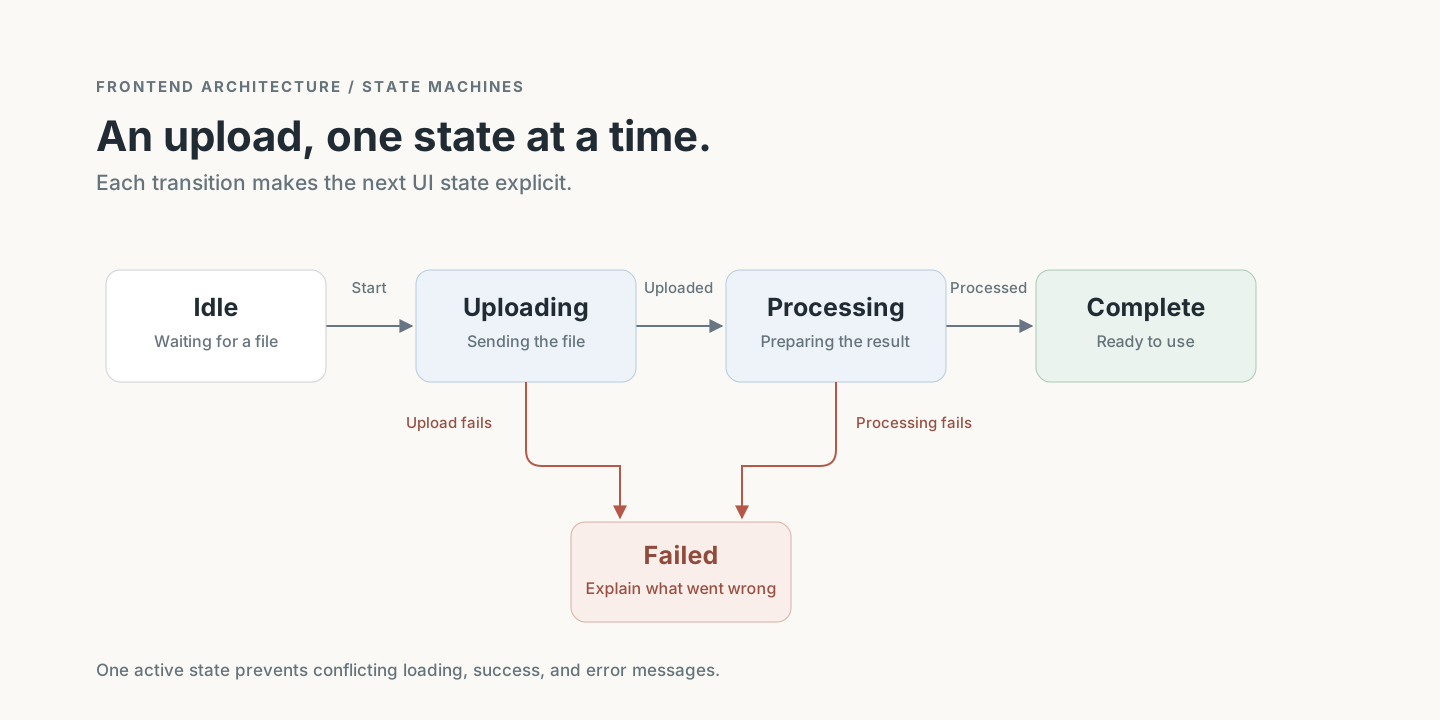
Explicit states can prevent contradictory combinations such as “complete” and “uploading” being true at the same time.
For a simple show-or-hide interaction, a boolean may be entirely sufficient.
What can we learn from large companies?
Large companies provide useful case studies, but their organizational needs may be very different from ours.
Atlassian publicly maintains a design system with components and design tokens. The transferable lesson is consistent UI contracts and shared design decisions. Atlassian Design System
AWS describes the Backend for Frontend pattern and cites Netflix’s adoption for client-specific needs. Microsoft also documents its benefits and operational tradeoffs. AWS: Backends for Frontends, Microsoft: Backends for Frontends
These examples do not establish one universal folder structure.
Before adopting a pattern, identify the pressure it addresses: independent teams, different clients, unstable integrations, complex workflows, or repeated behavior.
10. Handle Errors Where You Can Do Something Useful
Custom errors are valuable when callers need to distinguish failures.
For example:
export class InvoiceLockedError extends Error {
  constructor() {
    super("This invoice can no longer be edited.");
    this.name = "InvoiceLockedError";
  }
}
But not every failure needs a custom class. A normal Error is appropriate when no caller needs a more specific contract.
Avoid wrapping the same error at every layer. Wrap when you can add meaningful context, and preserve the original cause.
At the UI boundary, distinguish expected failures from unexpected ones:
- Validation errors should explain what needs correcting.
- Permission failures should explain the unavailable action.
- Unexpected failures should produce a safe message and useful diagnostics.
Report unexpected errors at a deliberate boundary to reduce duplicate monitoring events. Keep credentials, tokens, and sensitive payloads out of logs.
An error boundary can provide a fallback for rendering failures. It does not replace handling failed requests and event-handler operations.
11. Validate Trust Boundaries, Not an Arbitrary Number of Places
Validation does not belong in “at most two places.”
It belongs wherever data crosses a boundary that the application cannot safely trust.
Examples include API responses, submitted forms, imported files, browser storage, URL parameters, and worker messages.
The amount of validation should match the consequences of accepting bad data.
TypeScript helps during development, but a type annotation does not validate a response at runtime.
Frontend validation provides fast feedback. Server validation remains necessary because clients can be modified or bypassed.
Also separate structural validation from business rules:
- “Quantity must be a number” checks shape.
- “A paid invoice cannot be edited” checks a domain rule.
They solve different problems.
12. Keep Security Separate From the Appearance of Security
Encrypting tokens in browser storage with a key shipped in the same frontend does not create a reliable security boundary against malicious JavaScript executing in that application.
That script can potentially access the application’s decryption path or capture the token when it is used.
OWASP advises against storing session identifiers in local storage because JavaScript can access them. OWASP HTML5 Security Cheat Sheet
For applications where the architecture supports it, server-managed sessions with appropriately configured HttpOnly, Secure, and SameSite cookies can reduce direct JavaScript access to session credentials. Cookie-based authentication still needs appropriate CSRF protection and other session controls. OWASP Session Management Cheat Sheet
Authentication deserves its own design rather than a copy-pasted storage utility.
Similarly, a refresh interceptor needs careful handling of concurrent requests, retry limits, refresh failures, and refresh requests that must bypass the same interceptor.
Keep infrastructure configuration focused. Avoid making one HTTP client responsible for transport, global UI state, navigation, and every authentication decision.
13. Add Background Work After Measuring
A large codebase does not automatically need workers.
Web Workers are useful for expensive computation that would otherwise interrupt interaction: processing large datasets, parsing large files, or running substantial calculations.
They also introduce message contracts, cancellation behavior, error handling, and transfer overhead.
A slow network request usually does not need a worker; waiting for the response is already asynchronous.
Service workers have a different purpose, such as request interception and offline caching. They should not be treated as interchangeable with Web Workers.
Measure the delay, identify its cause, and introduce the smallest useful solution.
14. Make Quality Visible in Everyday Changes
Architecture helps developers find code. Production quality also depends on what happens when that code runs.
A practical review should cover:
- Behavior: Does the change preserve the intended business rules?
- Failures: Are loading, empty, error, and retry states understandable?
- Accessibility: Can users operate the interface with a keyboard, and are controls labeled?
- Reliability: Can stale requests or repeated clicks produce incorrect results?
- Testing: Are important calculations, workflows, and integration boundaries covered?
- Performance: Is there evidence of a bottleneck before adding optimization?
- Maintenance: Can the next developer understand the change without tracing unnecessary indirection?
Test according to risk. A payment transition deserves more scrutiny than a spacing adjustment.
Use automated checks for repeatable rules such as formatting, type checking, and prohibited imports. Reserve human review for behavior, tradeoffs, and clarity.
Let the Architecture Earn Its Complexity
When a frontend becomes difficult to maintain, adding more folders can feel like progress.
Sometimes the better change is smaller: extract a calculation, give an API boundary an owner, remove duplicated state, or split a component with unrelated responsibilities.
A useful abstraction makes the next change easier. An unnecessary abstraction makes the current change harder without a clear return.
Start with cohesive features. Keep dependencies understandable. Share stable concepts. Introduce patterns when the problem calls for them.
The goal is a codebase where a developer can answer three questions quickly:
Where does this behavior live? Who owns it? What else will change if I modify it?
Comments
Join the discussionNo comments yet. Be the first to comment.


